내가 연 것은 열람 신호로 세지 않습니다
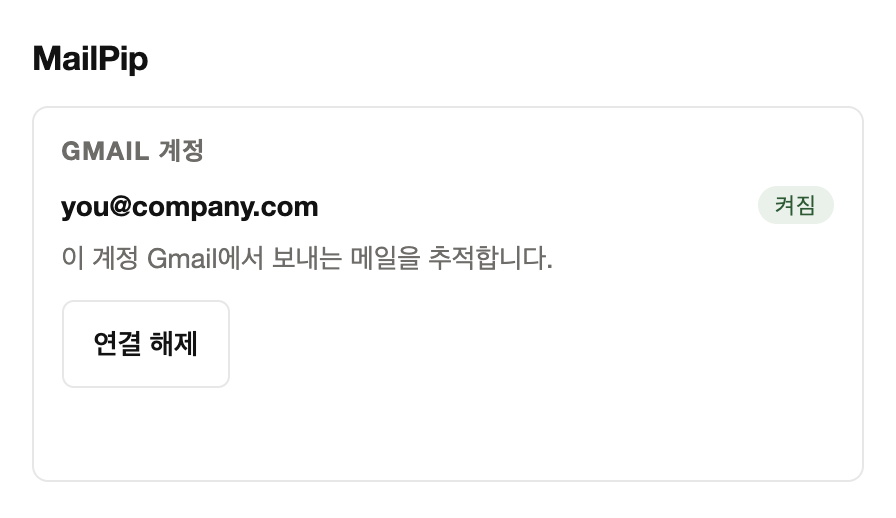
연결한 Gmail 계정의 추적 이미지는 이 Chrome 프로필의 Gmail 화면에서 불러오지 않도록 막습니다. 보낸 메일을 내가 열어 봐도 수신자의 열람 신호로 기록되지 않습니다.
확장이 없는 기기나 브라우저(휴대폰의 Gmail 앱 포함)에서 연 것은 막지 못합니다.
이 문서는 법무 확인 전 초안이며 게시용이 아닙니다. This document is a draft pending legal review and is not final.
노란 표시의 "확인 필요" 항목은 게시 전에 채워야 합니다. Items marked "to be confirmed" must be completed before publication.
Gmail에서 평소처럼 보내기만 하면 됩니다. Chrome 확장을 설치하고 Google 계정을 한 번 연결하세요.
연결한 Gmail 계정의 추적 이미지는 이 Chrome 프로필의 Gmail 화면에서 불러오지 않도록 막습니다. 보낸 메일을 내가 열어 봐도 수신자의 열람 신호로 기록되지 않습니다.
확장이 없는 기기나 브라우저(휴대폰의 Gmail 앱 포함)에서 연 것은 막지 못합니다.
메일은 사용자의 Gmail이 사용자 계정에서 그대로 보냅니다. MailPip 서버를 거치지 않는 구조라 스팸으로 분류될 가능성을 줄이는 쪽입니다.
받은편지함에 도착할지는 수신자의 메일 서비스가 정하며 MailPip은 약속하지 않습니다.
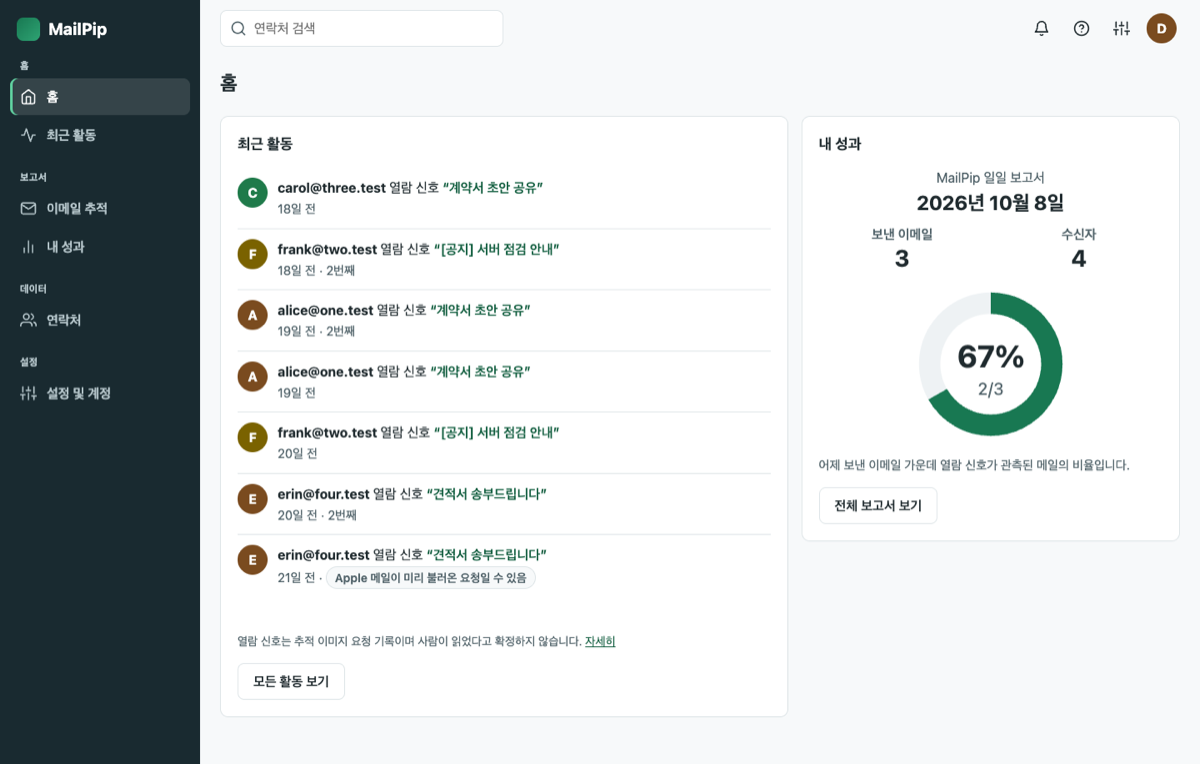
받는 사람이 둘 이상이면 수신자마다 사본을 따로 보내고, 각 사본에는 그 수신자 전용 추적 이미지가 들어갑니다. 메일 상세에서 수신자 3명 중 2명처럼 누구에게서 신호가 있었는지 구분해 봅니다.
열람 신호는 추적 이미지가 요청되었다는 기록이며 수신자가 읽었다는 증거가 아닙니다.
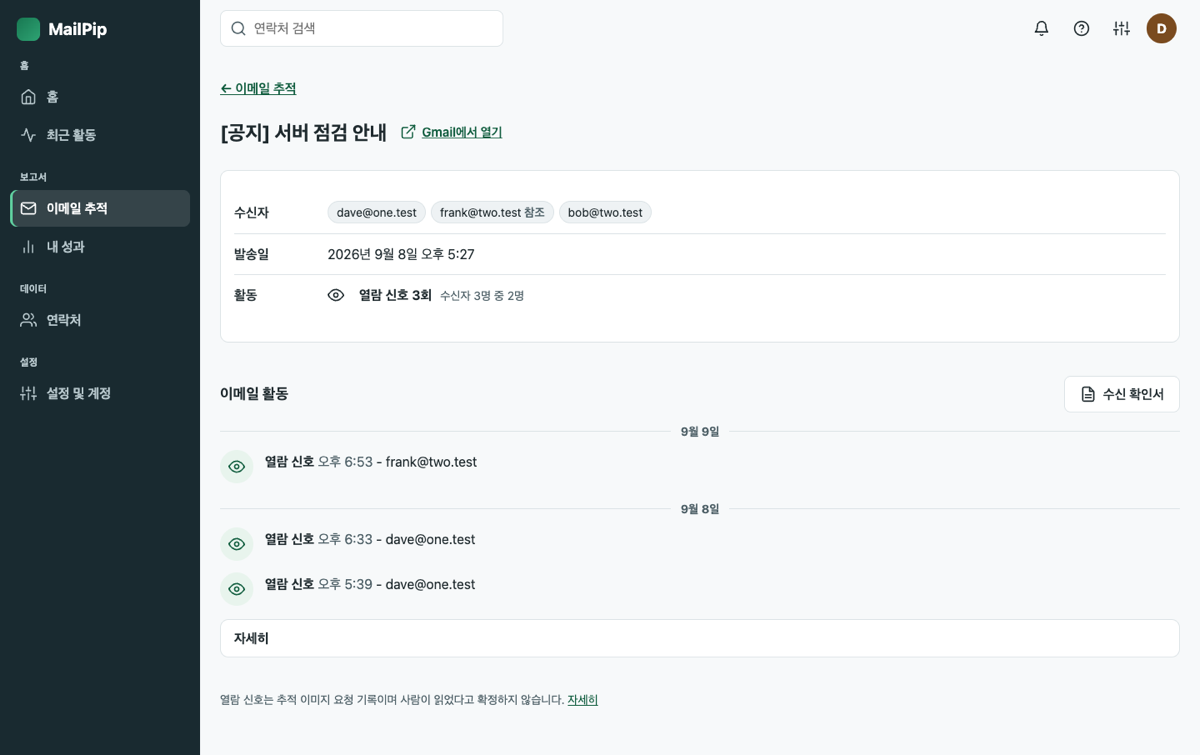
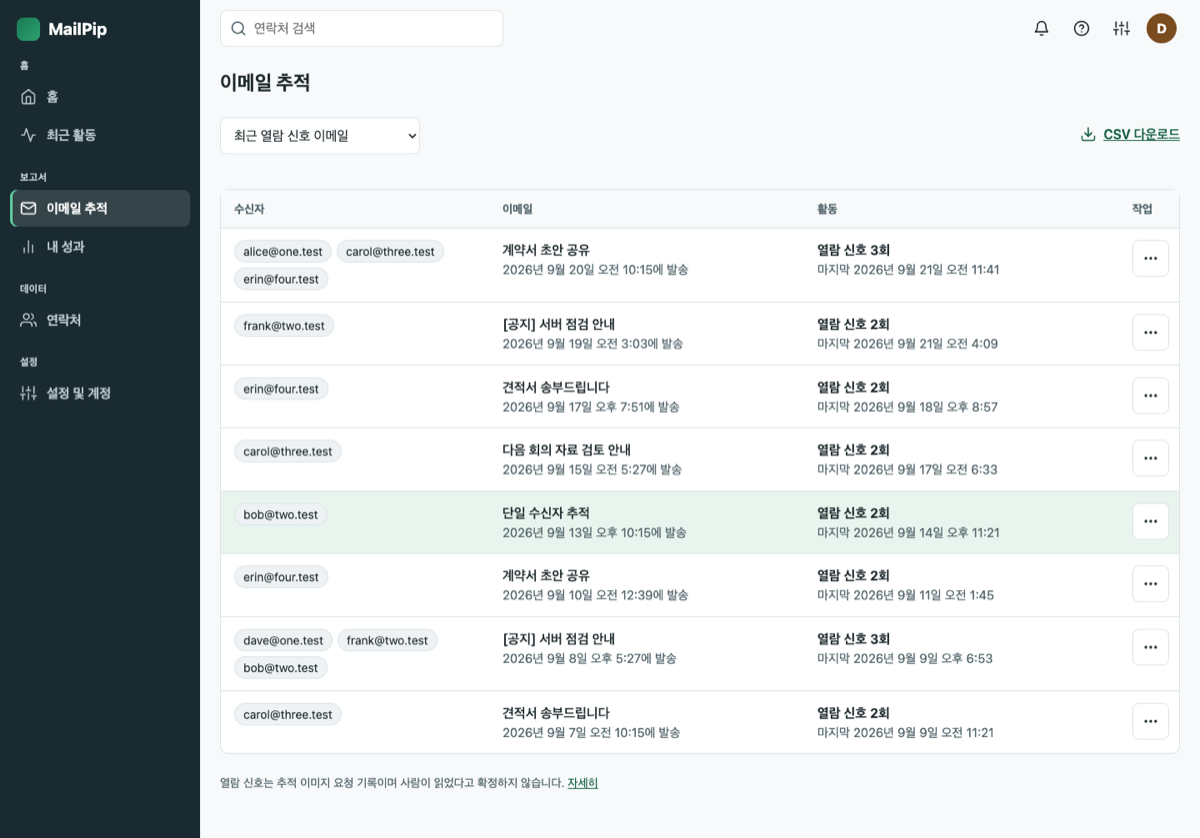
로그인하면 보낸 메일과 열람 신호를 화면별로 나눠 봅니다.
열람 신호를 날짜별로 모아 보여 줍니다.
보낸 메일을 최근 열람 신호, 전체, 열람 신호 없음으로 나눠 보고 CSV로 내려받습니다.
기간별 열람 신호율과 발송 시간대를 봅니다.
받는 사람별로 보낸 메일과 열람 신호가 있었던 메일을 모아 봅니다.
메일 하나의 기록을 A4 문서로 인쇄하거나 PDF로 저장합니다.

Apple 메일은 사람이 읽기 전에 받은 메일의 이미지를 미리 불러옵니다. 그런 요청이면 "미리 불러온 요청일 수 있음"으로 구분해 보이고 사람이 읽었다고 말하지 않습니다. Gmail 보안 검사가 가져간 요청은 열람 신호에 넣지 않습니다.
작성 원문과 첨부는 암호화해 발송이 끝나면 지웁니다. 받은편지함의 메일은 읽지 않습니다. 메시지 정보와 열람 신호는 계정이 있는 동안 보관하고, 계정을 삭제하면 지웁니다. 사용자 데이터를 판매하지 않고 광고에 쓰지 않습니다. 보관 항목과 기간
Google API로 받은 정보의 사용에 대한 고지를 영문 원문 그대로 싣습니다. 자세한 내용은 개인정보 처리방침 6절에 있습니다.
MailPip's use of information received from Google APIs will adhere to Google API Services User Data Policy, including the Limited Use requirements.
The use of information received from Google APIs will adhere to the Chrome Web Store User Data Policy, including the Limited Use requirements.
요금 정책은 확정 뒤 이 자리에 안내합니다. 확인 필요: 요금 정책
메일에 넣은 수신자 전용 추적 이미지가 서버에 요청된 기록입니다. 사람이 읽었다는 증거가 아니며, 신호가 없다고 읽지 않은 것도 아닙니다. 메일 앱이 이미지를 자동으로 불러와도 기록될 수 있습니다. 이용약관 6절
Apple 메일은 사람이 읽지 않아도 받은 메일의 이미지를 미리 불러옵니다. 그래서 관측된 요청이 모두 Apple 중계를 거친 경우에는 "Apple 메일이 미리 불러온 요청일 수 있음"으로 구분해 보이며, 사람이 읽었다고 말하지 않습니다.
확장이 켜진 Chrome 프로필의 Gmail 화면에서는 기록되지 않도록 막습니다. 휴대폰의 Gmail 앱처럼 확장이 없는 곳에서 보낸편지함을 열면 본인 열람이 신호로 잡힐 수 있습니다.
Google이 메일을 검사하며 이미지를 가져가는 요청은 사람의 열람이 아니므로 열람 신호 횟수, 최근 활동, 수신 확인서에 넣지 않고 메일 상세의 타임라인에서도 숨깁니다. 메일 상세의 "자세히"에서 수신자별 "요청 출처"에만 "열람 아님"으로 따로 셉니다.
받는 사람이 한 명이면 Gmail이 사용자 계정에서 직접 보내고, 둘 이상이면 MailPip 서버가 사용자의 Gmail로 수신자별 사본을 대신 보냅니다. 어느 쪽이든 받은편지함 도착과 스팸 분류는 수신자의 메일 서비스가 정하며 MailPip은 약속하지 않습니다.
서버는 받은편지함의 메일 목록과 본문을 읽거나 분석하거나 저장하지 않습니다. 보내려는 메일은 발송에 필요한 동안만 암호화해 두고 끝나면 지웁니다. 개인정보 및 보안 센터
웹 앱의 이메일 추적에서 지울 메일 줄 끝의 ⋯ 메뉴를 열고 "이메일 데이터 삭제"를 고릅니다. MailPip의 추적 기록만 지우며 Gmail에 있는 메일은 지워지지 않습니다. 발송이 진행 중인 메일은 끝난 뒤에 지울 수 있습니다.
확장을 제거하면 Gmail에서 새 메일의 추적이 켜지지 않습니다. MailPip 계정과 추적 기록은 남아 있으며, 모두 지우려면 웹 앱의 설정 및 계정에서 계정을 삭제하십시오. 삭제와 연결 해제
MailPip이 어떤 권한을 왜 쓰는지, 무엇을 어디에 보관하는지, 연결 해제와 삭제는 어떻게 하는지를 질문과 답으로 정리했습니다.
데스크톱 Chrome의 Gmail 웹 화면에서 동작합니다. 설치한 뒤 열리는 안내 탭에서 Google 계정을 한 번 연결합니다.
Chrome 웹스토어 주소는 게시 때 연결합니다 확인 필요: Chrome 웹스토어 주소
문의는 support@mailpip.app으로 받습니다. 서비스 운영자 정보는 이용약관에 있습니다.
Send from Gmail as usual. Install the Chrome extension and connect your Google account once.
MailPip blocks the tracking images of your connected Gmail account from loading in Gmail in this Chrome profile. Opening an email you sent is not recorded as the recipient's open signal.
Opens on devices or browsers without the extension (including the Gmail app on a phone) cannot be blocked.
Gmail sends the email from your own account as it is. Because it does not pass through a MailPip server, the structure leans toward lowering the chance of being classified as spam.
Whether it reaches the inbox is decided by the recipient's mail service, and MailPip makes no promise about it.
With two or more recipients, MailPip sends each recipient a separate copy, and each copy carries a tracking image unique to that recipient. On the email detail screen you can tell who an open signal came from, for example 2 of 3 recipients.
An open signal is a record that a tracking image was requested. It is not proof that the recipient read the email.
After you sign in, sent emails and open signals are split across screens.
Open signals collected by date.
Browse sent emails as recent open signals, all, or no open signal, and download them as CSV.
The open signal rate and send hours for a period.
Emails sent to each recipient and the ones with an open signal, gathered together.
Print the record of one email as an A4 document or save it as a PDF.
Apple Mail preloads the images of a received email before anyone reads it. Such a request is shown as "may have been preloaded", and MailPip does not say a person read the email. Requests fetched by Gmail's security scan are not counted as open signals.
Message content and attachments are encrypted and deleted once sending finishes. Messages in your inbox are not read. Message information and open signals are kept while your account exists, and deleted when you delete your account. User data is not sold and is not used for advertising. What is kept, and for how long
These are the disclosures about the use of information received from Google APIs, quoted word for word. Details are in section 6 of the Privacy Policy.
MailPip's use of information received from Google APIs will adhere to Google API Services User Data Policy, including the Limited Use requirements.
The use of information received from Google APIs will adhere to the Chrome Web Store User Data Policy, including the Limited Use requirements.
The pricing policy will be announced in this place once it is confirmed. To be confirmed: pricing policy
It is a record that the tracking image unique to a recipient was requested from the server. It is not proof that the recipient read the email, and the absence of a signal does not mean the email was unread. A mail app can load the image automatically and still be recorded. Terms of Service, section 6
Apple Mail preloads the images of a received email even if nobody reads it. When every observed request went through Apple's relay, the activity is labeled "may have been preloaded by Apple Mail", and MailPip does not say a person read the email.
It is blocked from being recorded in Gmail in a Chrome profile where the extension is on. If you open your Sent folder somewhere without the extension, such as the Gmail app on a phone, your own open can be recorded as a signal.
When Google scans an email and fetches the image, that request is not a person opening it, so it is left out of the open signal count, the recent activity list, the receipt certificate and the timeline of the email detail screen. It appears only under "Details" on that screen, in the per-recipient "request source" column, counted separately as "not an open".
With only one recipient, Gmail sends the email directly from your account. With two or more, the MailPip server sends a separate copy per recipient through your Gmail. Either way, reaching the inbox and spam classification are decided by the recipient's mail service, and MailPip makes no promise about them.
The server does not read, analyze or store the message list or message contents of your inbox. The email you are sending is held encrypted only while sending needs it and is deleted when it finishes. Privacy and Security Center
In Email tracking in the web app, open the ⋯ menu at the end of the email's row and choose "Delete email data". Only MailPip's tracking record is deleted, and the email in Gmail stays. An email that is still being sent can be deleted after it finishes.
If you remove the extension, tracking is no longer turned on for new emails in Gmail. Your MailPip account and tracking records stay, so to delete everything, delete your account in Settings and account of the web app. Deletion and disconnecting
Questions and answers on which permissions MailPip uses and why, what it keeps and where, and how to disconnect and delete.
It works on the Gmail web page in desktop Chrome. On the guide tab that opens after installing, connect your Google account once.
The Chrome Web Store address will be linked at publication To be confirmed: Chrome Web Store address
Questions can be sent to support@mailpip.app. Operator details are in the Terms of Service.